



ArchiCAD Hacks for Beginners: Essential Shortcut Keys to Speed Up Drafting

If you’re new to ArchiCAD, you might still be navigating menus, clicking multiple tools, and spending more time drafting than necessary. The truth is, most experienced ArchiCAD users don’t work faster because they click faster, they work faster because they use shortcut keys.

In a professional drafting environment where time directly impacts project delivery, these small workflow improvements make a big difference. This guide covers essential ArchiCAD shortcut keys for beginners that can immediately speed up your workflow.

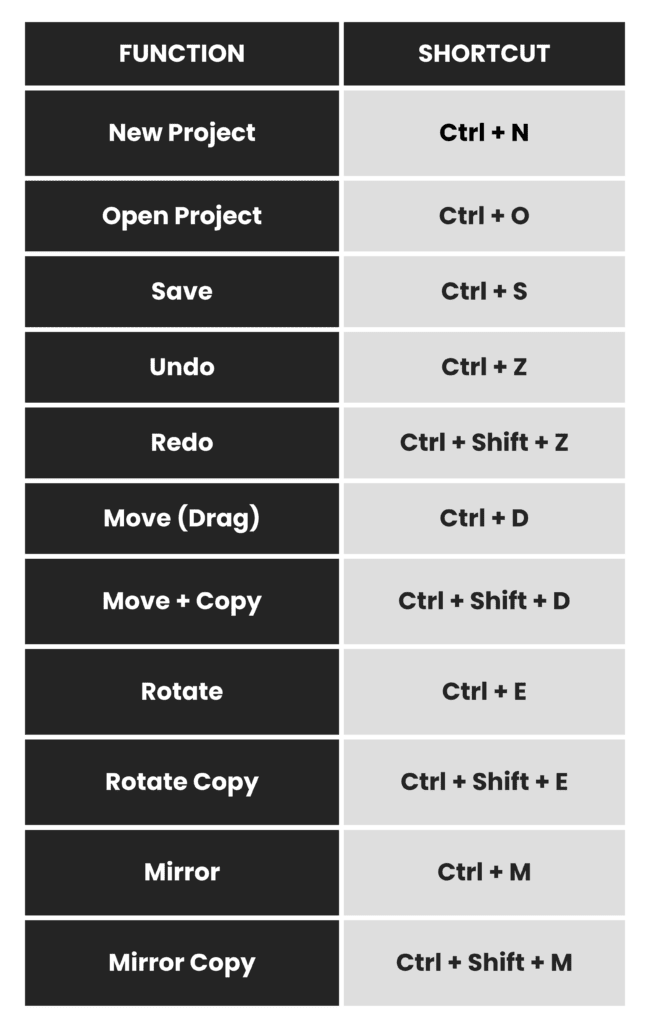
Basic ArchiCAD Shortcuts (Start Using These First)

These are the most commonly used shortcuts that every beginner should memorize first. They are used in almost every project.

These may seem simple, but using them consistently instead of navigating through menus can save a surprising amount of time over a full drafting day.

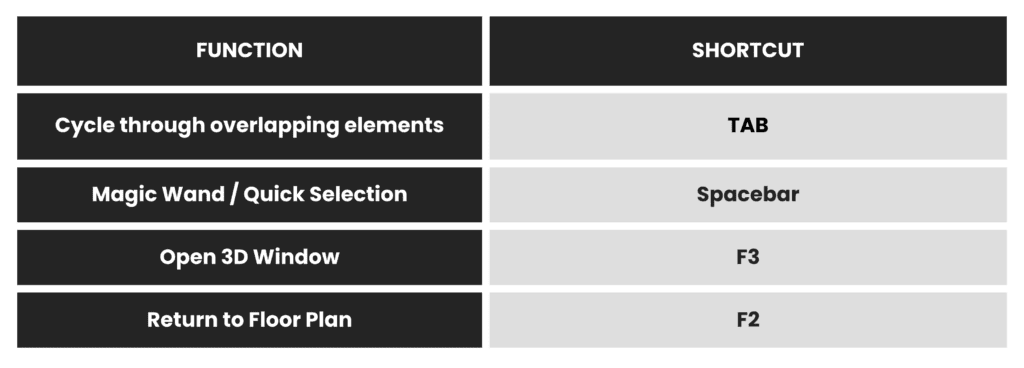
Selection & Navigation Shortcuts

One of the most frustrating things for beginners is selecting the correct element when multiple elements overlap. These shortcuts make selection much easier and faster.

These shortcuts help you move between 2D drafting and 3D modeling quickly, which is essential in a BIM workflow.

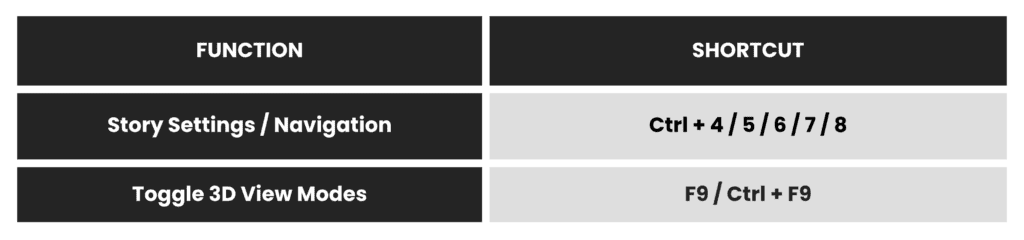
Story & View Shortcuts (Very Useful in BIM Projects)

When working on multi-story buildings, switching between stories and views is very common. These shortcuts help you navigate faster.

These are especially useful when reviewing models, checking coordination, or switching between floor plans and 3D views.

Bonus Tip: Customize Your Own Shortcuts

One of the most powerful features in ArchiCAD is that you can customize your own shortcut keys based on your workflow.

To do this:

  • Go to Options → Work Environment → Keyboard Shortcuts
  • Assign your preferred shortcuts
  • Save and export your shortcut scheme

This is very useful if you work on multiple computers or if your office has a standard shortcut setup. Saving your shortcut scheme ensures consistency across projects and teams.

Final Thoughts

Learning shortcut keys may feel slow at first, but it is one of the fastest ways to improve your ArchiCAD productivity. Instead of memorizing everything at once, start with the basic editing shortcuts like Move, Rotate, Mirror, Undo, and Save. Once those become habit, you can add navigation and 3D shortcuts to your workflow.

If you’re working on architectural drafting, BIM modeling, or construction documentation daily, investing time in learning shortcuts is absolutely worth it! 

Enjoyed this blog? Give a thumbs up or leave a comment!

Explore more resources here or book a quick strategy call to learn how MGS Global Group can support all your drafting needs! 

Connect with us!

1078500cookie-checkArchiCAD Hacks for Beginners: Essential Shortcut Keys to Speed Up Drafting
Subscribe
Notify of
guest
0 Comments
Oldest
Newest Most Voted
Inline Feedbacks
View all comments
error: