Twinmotion vs D5 Render: Which One’s Better for Architects?
- 3 min read
- January 28, 2026
When it comes to architectural drafting and visualization, speed, accuracy, and clarity matter just as much as aesthetics. Real-time rendering tools have become a natural extension of the drafting workflow, helping architects quickly turn BIM or CAD models into compelling visuals for internal reviews, design coordination, and client presentations.
Two names dominate this space right now: Twinmotion and D5 Render. Both are powerful, both are popular, but they serve slightly different needs.
In this blog, we break down Twinmotion vs D5 Render from a drafting-first perspective, so you can decide which tool best supports your architectural workflow.
Why Real-Time Rendering Matters in Drafting
Traditionally, drafting and visualization lived in separate silos. Today, real-time renderers bridge that gap. They allow architects to:
- Validate design intent early
Catch material, lighting, and spatial issues faster - Communicate ideas clearly to clients and consultants
- Reduce rework during later design stages
For drafting teams handling fast-paced projects, the right rendering tool can significantly improve efficiency without disrupting production timelines.
Twinmotion: Strengths and Use Cases
Twinmotion is built on Unreal Engine and is widely known for its cinematic-quality visuals and immersive presentations.
What Twinmotion Does Well
- Realistic lighting and atmosphere: Twinmotion uses advanced lighting systems like Lumen and Path Tracer, producing highly realistic shadows, reflections, and global illumination. This is especially effective for exterior scenes and daylight studies.
- Animated assets and walkthroughs: From moving people and vehicles to seasonal changes and weather effects, Twinmotion excels at adding life to static models. This makes it a strong choice for client-facing walkthroughs and concept presentations.
- Rich content ecosystem: With built-in access to Quixel Megascans, Sketchfab, and Adobe Substance materials, Twinmotion offers a vast library of ready-to-use assets, useful when drafting teams need quick context without custom modeling.
- Cost advantage: Twinmotion is free for many users, which makes it attractive for firms that want high-end visuals without adding software costs during early drafting phases.
Where Twinmotion May Feel Heavy
- Performance can depend heavily on system specs
- Not always the fastest option for quick design iterations
- Can feel overpowered for simple drafting-stage visuals
D5 Render: Strengths and Use Cases
D5 Render has gained rapid traction among architects for one key reason: speed without sacrificing realism.
What D5 Render Does Well
- Fast setup and real-time feedback: D5 is designed for efficiency. Drafting teams can import models, assign materials, adjust lighting, and render scenes with minimal setup, ideal for tight deadlines.
- Real-time ray tracing: D5’s ray tracing produces accurate reflections, shadows, and surface details. Materials like concrete, glass, and metal read realistically even during early-stage design reviews.
- AI-assisted tools: Features like AI atmosphere matching and style transfer automatically balance lighting and tone, helping teams achieve consistent results quickly—especially useful during iterative drafting cycles.
- Stable performance on mid-range hardware: Unlike some heavier renderers, D5 runs smoothly on mid-range GPUs, making it accessible for distributed drafting teams.
Where D5 Render May Fall Short
- Fewer cinematic animation options compared to Twinmotion
- Subscription-based pricing
- Less emphasis on large-scale storytelling visuals
Which One Should Architects Choose?
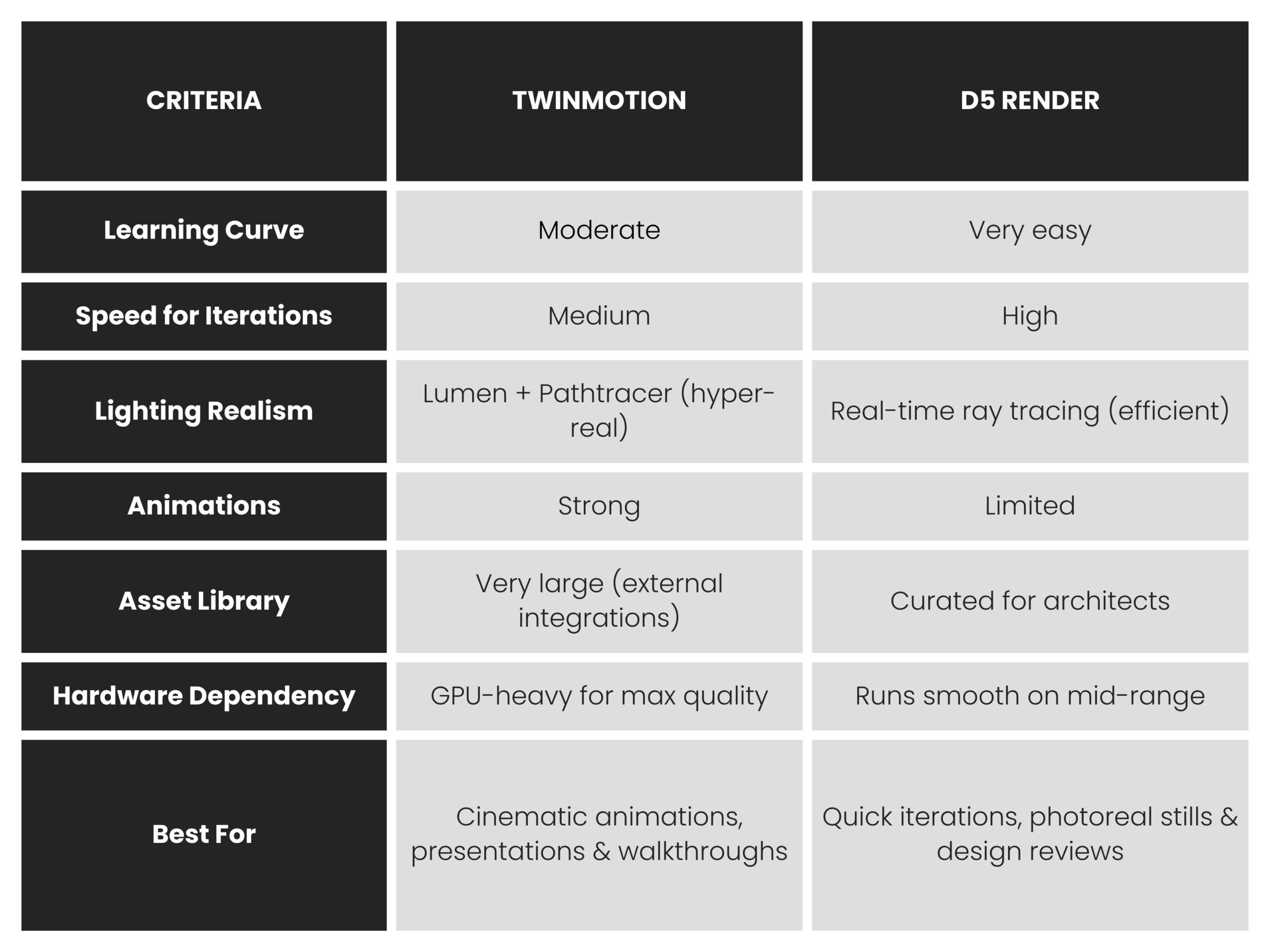
There’s no universal winner, only the right tool for your workflow.
Choose Twinmotion if:
- You create immersive walkthroughs or client-facing presentations
- Animation and storytelling are key deliverables
- You want cinematic-quality visuals with minimal upfront cost
Choose D5 Render if:
- Speed and consistency matter more than spectacle
- You need frequent design updates during drafting stages
- Your team works on mid-range hardware with tight timelines
Many firms actually use both — D5 Render during drafting and coordination phases, and Twinmotion for final presentations.
Wrapping Up
From a drafting standpoint, rendering tools should support, not slow down, the production process. Both Twinmotion and D5 Render integrate well into modern architectural workflows, but they shine at different moments in a project lifecycle.
The best approach? Test both on real project models and which aligns better with your team’s pace, hardware, and client expectations.At the end of the day, the right choice isn’t about feature count, it’s about which software best supports how your team drafts, iterates, and delivers projects.
Enjoyed this post?
Explore more resources here or book a quick call to learn how MGS Global Group can support your drafting and construction documentation needs.