




AutoCAD vs AutoCAD LT 2027: Which One Do You Need?

Here’s a question that could save your firm more than $1,500 a year per seat: do you actually need full AutoCAD, or would AutoCAD LT do the job? 

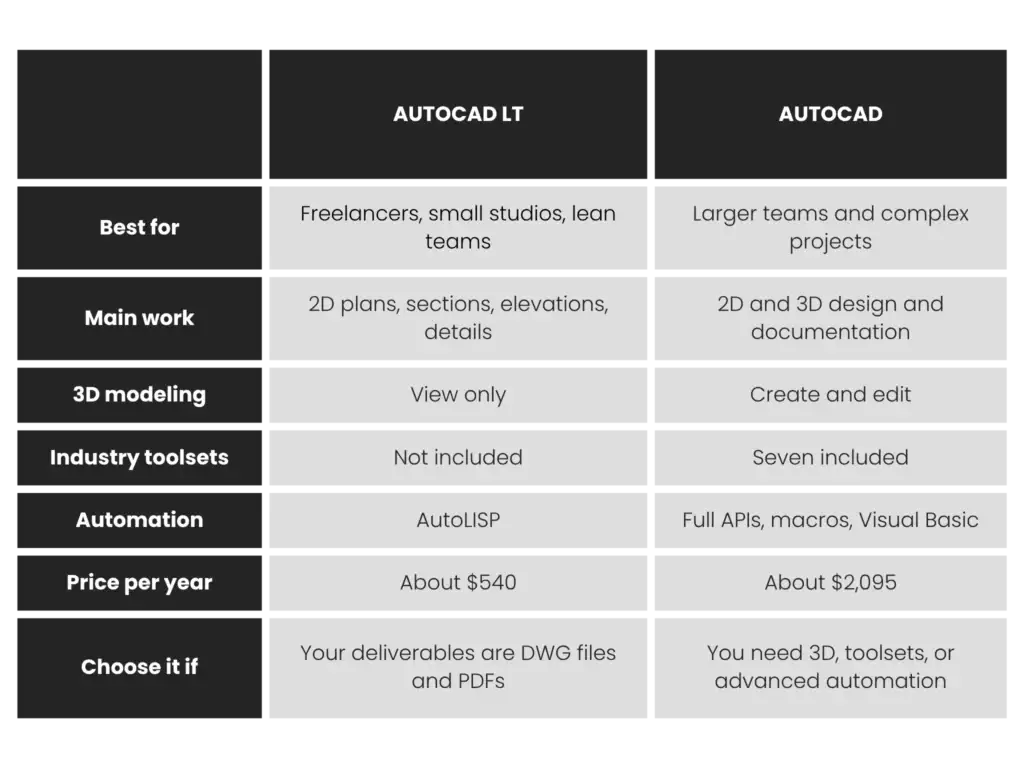
Open both and they look almost identical. Same interface, same commands, same DWG files. The price, though, is very different. At Autodesk’s current list prices, full AutoCAD is about $2,095 a year, while AutoCAD LT is about $540. For a lot of architects and drafters, that gap pays for features they never touch.

Autodesk released the 2027 versions in March 2026, so here’s what each one gives you today and how to choose.

The Short Answer

If your work is mostly 2D, like floor plans, elevations, sections, details, and construction documents, AutoCAD LT is probably enough. If you need 3D modeling, industry toolsets, or heavy automation, full AutoCAD earns its price. 

What You Get in Both

AutoCAD LT is not a stripped down trial. Both versions include: 

  • Precise 2D drafting, drawing, and documentation tools
  • DWG file creation and editing, so sharing with consultants and clients is easy
  • Web and mobile access to view, create, and edit drawings
  • Smart Blocks, Count, and Trace for faster, cleaner drafting
  • PDF import and export, plus markup and sharing through Autodesk tools
  • Activity Insights to track version history and compare drawings
  • Support for both Windows and Mac

What’s New in 2027

In both versions: 

  • Autodesk Assistant: AI guidance built into the software, so you can ask questions about commands and workflows without leaving your drawing
  • Geometry Cleanup: Finds gaps, overshoots, undershoots, and misaligned angles, then suggests fixes. It’s handy for old drawings that refuse to behave
  • Connected References: For drawings stored in Autodesk’s cloud, it spots moved or renamed Xrefs and suggests repairs

The 2027.1 update also added small time savers, like a Lengthen option for polylines and a SAVEAS that does a full save to keep DWG files healthy. 

What’s New Only in Full AutoCAD 2027: 

  • Checkout: Several people can work in the same DWG at once by checking out only the geometry they need, instead of locking the whole drawing
  • Forma Data Management Essentials: Cloud DWG storage, markup, issue tracking, and version history, included with standalone AutoCAD subscriptions
  • Smoother 3D navigation: Expanded graphics support for realistic visual styles, materials, and lighting

What Else Only Full AutoCAD Gives You

This is where the extra cost goes. 

  1. 3D modeling: LT can view 3D models but can’t create or edit them
  2. Industry toolsets: Seven toolsets, including Architecture, MEP, and Map 3D
  3. Advanced automation: Full APIs, Visual Basic, and macros (LT supports AutoLISP)
  4. Extras: Point clouds and CAD standards checking

How Much Do They Cost?

Autodesk’s list prices at the time of writing: 

  • AutoCAD LT: $70 per month, $540 per year, or $1,620 for three years
  • AutoCAD: $260 per month, $2,095 per year, or $6,285 for three years

Both are subscription only, since Autodesk no longer sells perpetual licenses, and prices can vary by region.

Which One Should You Choose?

Not sure? If you rarely touch 3D or toolsets, start with LT. You can always upgrade later.

Want to Learn More About AutoCAD?

Whichever version you pick, you’ll get more out of it with a few good tutorials. We’ve put together an AutoCAD playlist on our YouTube channel with more videos on the topic. Watch the AutoCAD playlist here and keep building your skills.

Final Thoughts

Most day to day drafting doesn’t need everything full AutoCAD offers. Pay for the tools you will actually use, and your budget goes further.

The right software is only half of the equation, though. Whether your team runs AutoCAD, AutoCAD LT, or Revit, a busy project schedule can still outpace your capacity. That’s where our architectural drafting services and architecture production support come in. We work as an extension of your team, handling drawings and documentation so your firm can keep deadlines without piling on overtime.

Find out how MGS works as an extension of your team!

Enjoyed this blog? Give a thumbs up or leave a comment! 

Explore more resources here or book a quick strategy call to learn how MGS Global Group can support all your drafting needs!

Connect with us!

1116760cookie-checkAutoCAD vs AutoCAD LT 2027: Which One Do You Need?
Subscribe
Notify of
guest
0 Comments
Oldest
Newest Most Voted
error: